
Most Android app vulnerabilities are not caused by advanced attacks. They usually begin with ordinary implementation mistakes: excessive permissions, unsafe storage, exposed interfaces, insecure transmission, or careless logging. These problems keep appearing because they often look harmless during development.
I’ve noticed that many Android security discussions focus heavily on dramatic exploits and sophisticated malware. Those issues matter, but a large number of real application weaknesses come from much simpler decisions developers make every day.
An app does not need a catastrophic bug to expose users. Sometimes a small shortcut, a broad permission request, or a forgotten debug log quietly creates an attack surface that should never have existed.
What makes these mistakes dangerous is that they often survive normal testing because the app still works correctly from the user’s perspective.
Takeaways
- Many Android vulnerabilities come from implementation mistakes, not complex exploits.
- Permissions, IPC endpoints, logs, storage, and network transmission are recurring weak points.
- Apps often expose more access than their real functionality requires.
- Small convenience decisions during development can become long-term security problems.
Security Problems Often Start With Developer Assumptions
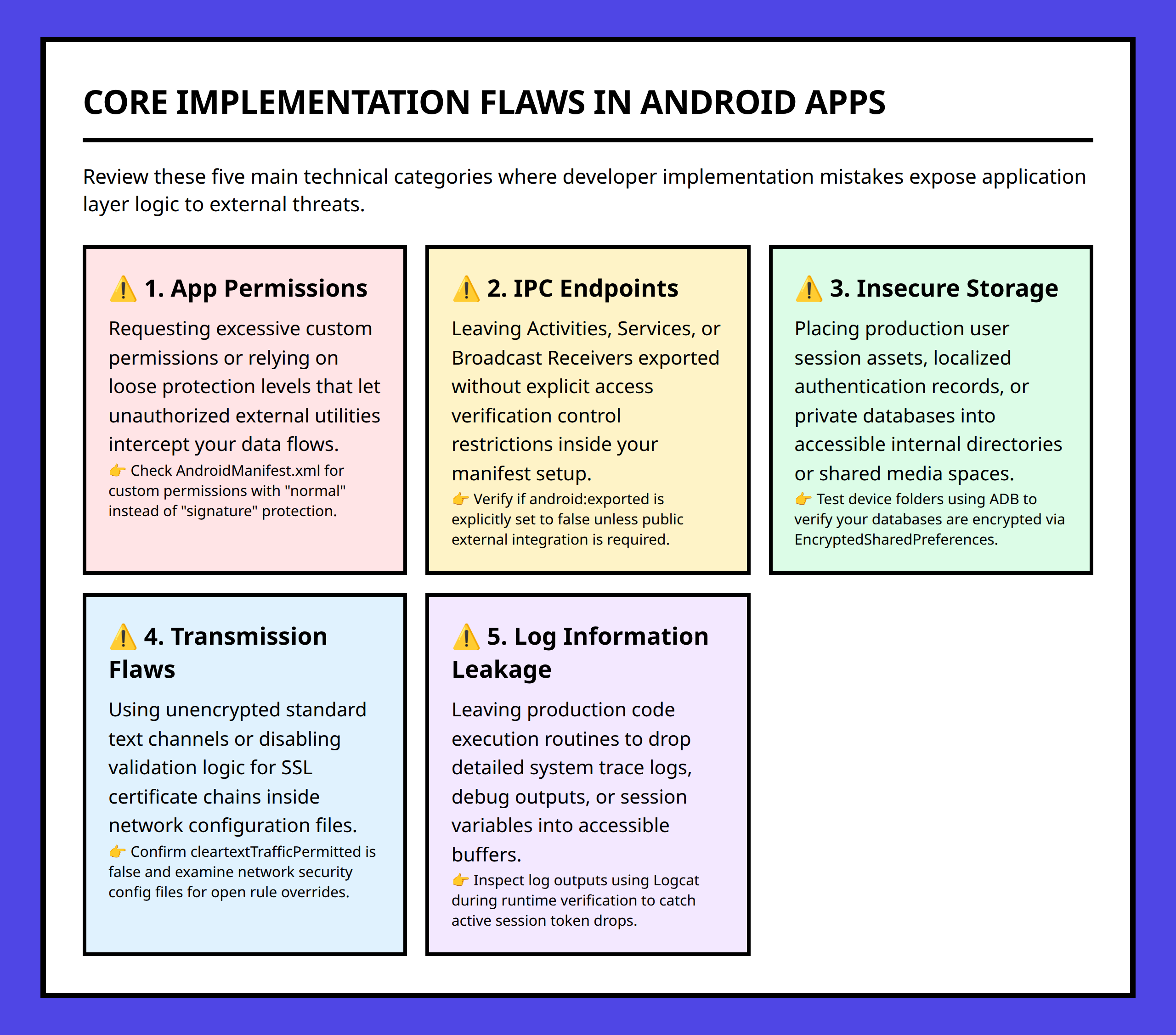
A pattern appears repeatedly in Android application security: developers assume certain behaviors are safe because the application feels isolated inside Android’s security model.
That assumption is only partially true.
Android provides sandboxing and permission enforcement, but applications still create their own attack surfaces through the way they store data, expose interfaces, and communicate with other components.
I think this is one reason mobile security problems persist even in mature ecosystems. Platform protections reduce risk, but they do not automatically protect applications from weak implementation choices.
A developer under deadline pressure may prioritize usability and feature delivery first. Security decisions often become secondary unless someone actively reviews them.
That is where recurring mistakes begin.
Requesting Too Many Permissions Expands Risk Quickly
Permission misuse remains one of the most visible Android security problems.
Sometimes applications request permissions that are broader than their actual functionality requires. Other times developers add permissions preemptively because they might become useful later.
From a security perspective, this creates unnecessary exposure.
Every additional permission increases what the application can reach if it becomes compromised or behaves maliciously.
A simple flashlight app should not normally need access to contacts, SMS messages, or microphone data. When permissions exceed the app’s clear purpose, trust becomes harder to justify.
I usually see this as a design-discipline problem more than a purely technical one.
Developers sometimes treat permissions as low-cost additions because Android prompts the user anyway. But once permission access exists inside the application, the attack surface changes permanently.
The safest permission is often the permission the application never requested.
Insecure Data Transmission Still Appears Too Often
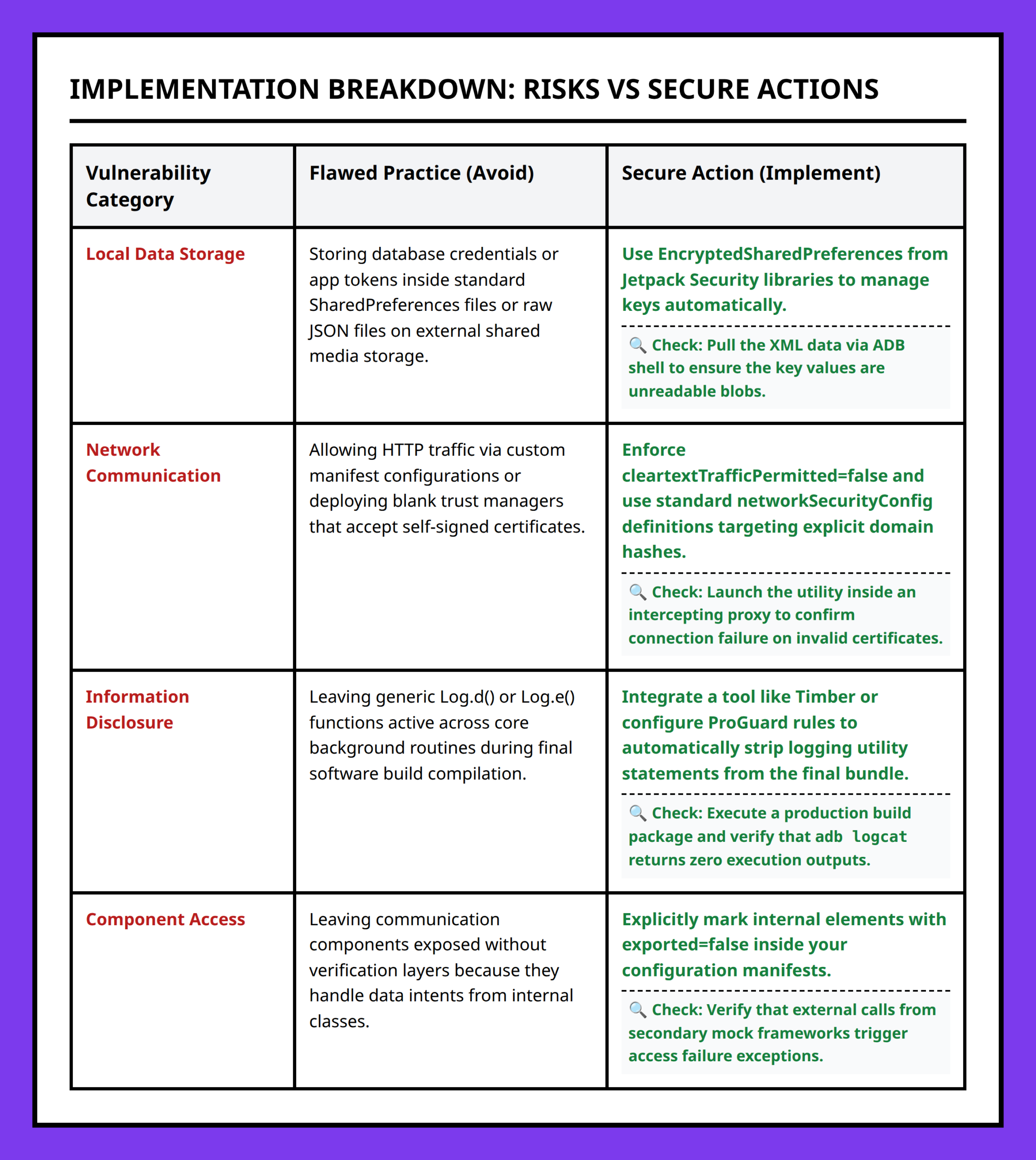
One of the most persistent mobile security failures is transmitting sensitive information insecurely.
Applications frequently exchange:
- User credentials
- Authentication tokens
- Personal information
- Session identifiers
- Application data
If those communications are not protected properly, attackers monitoring network traffic may capture or manipulate information during transmission.
What makes this problem frustrating is that insecure transmission sometimes survives because developers test mainly in trusted environments.
An app may behave perfectly on an office Wi-Fi network or during local development. The risk becomes visible later when the application operates on public hotspots, hotel networks, shared office spaces, or poorly secured routers.
A realistic situation is easy to imagine:
A small startup releases an Android app quickly to meet a launch deadline. Login requests work correctly, users can sign in, and internal testing looks successful. Months later, someone discovers parts of the application still send sensitive information without proper transport protection because convenience shortcuts from development remained in production code.
The application functioned correctly the entire time. The security problem existed underneath the user experience.
Unsafe Local Storage Creates Quiet Data Leaks
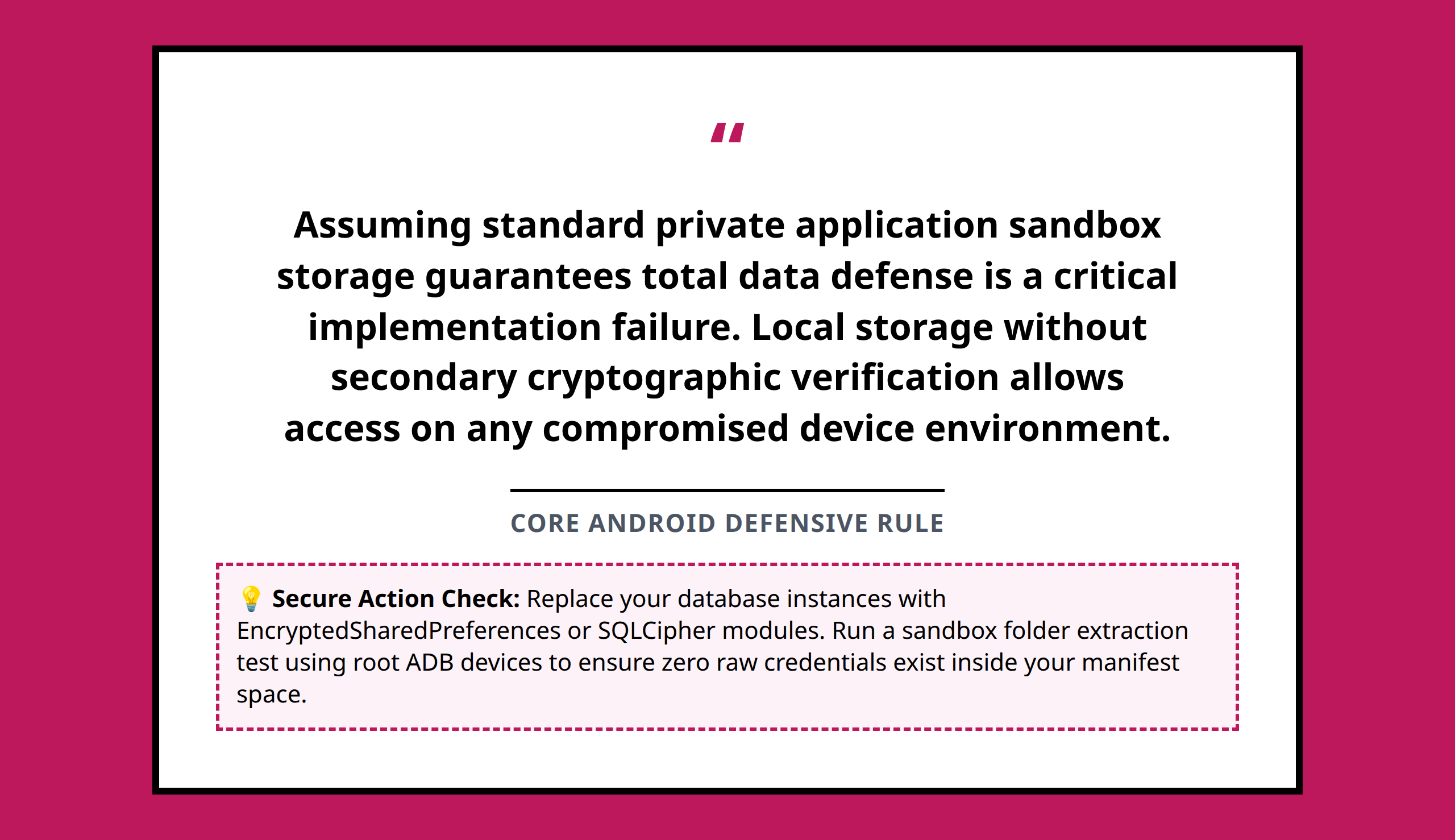
Android applications often store information locally for speed, convenience, or offline functionality.
The problem begins when developers treat local storage as automatically private.
Sensitive information stored insecurely may become accessible through backups, rooted devices, debugging tools, misconfigured file permissions, or exposed application components.
Examples of risky stored data include:
- Passwords
- Authentication tokens
- Session data
- User identifiers
- Personal records
- API keys
I think local storage problems often happen because convenience wins over caution during implementation.
Saving information locally can simplify application behavior dramatically. The app launches faster, users stay signed in, and workflows feel smoother.
But every stored secret creates a persistence problem. Once sensitive data exists on the device, developers need to think carefully about who else may eventually access it.
Logging Sensitive Information Becomes a Hidden Liability
Logging is incredibly useful during development.
Developers use logs to diagnose crashes, trace execution flow, inspect variables, and debug application behavior. The problem appears when sensitive information accidentally enters those logs.
Android logs may expose:
- Usernames
- Tokens
- Internal application states
- Error traces
- Configuration details
- Authentication information
What makes logging dangerous is that it rarely feels dangerous during development.
A developer adds temporary debugging output to solve a problem quickly. The feature gets fixed, the application ships, and the debug information quietly remains in production.
I pay close attention to logging because it often reveals more about an application than developers intended.
Even partial information leakage can help attackers map application behavior, understand backend systems, or discover weak assumptions.
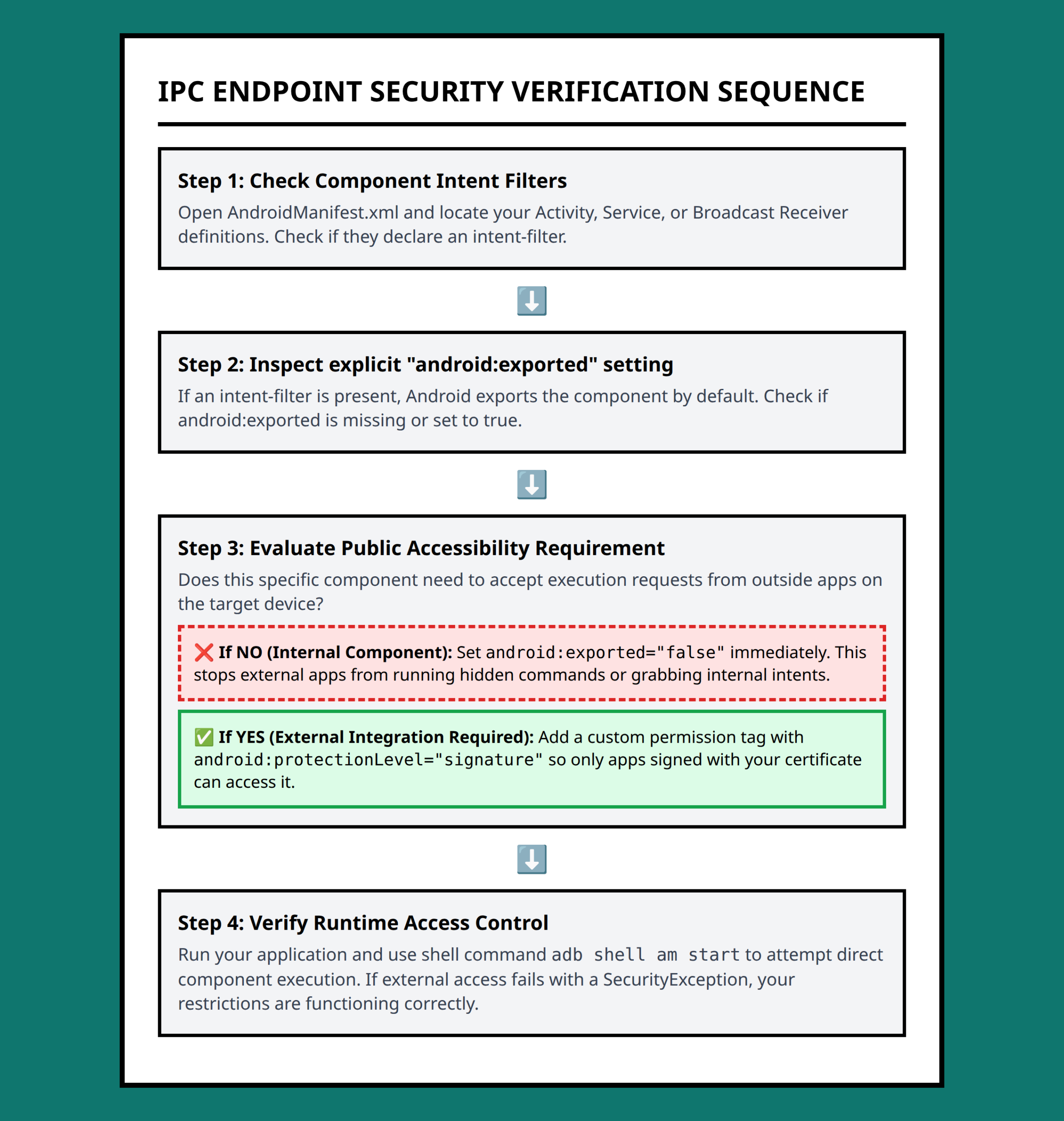
Unsecured IPC Endpoints Create Unexpected Entry Points
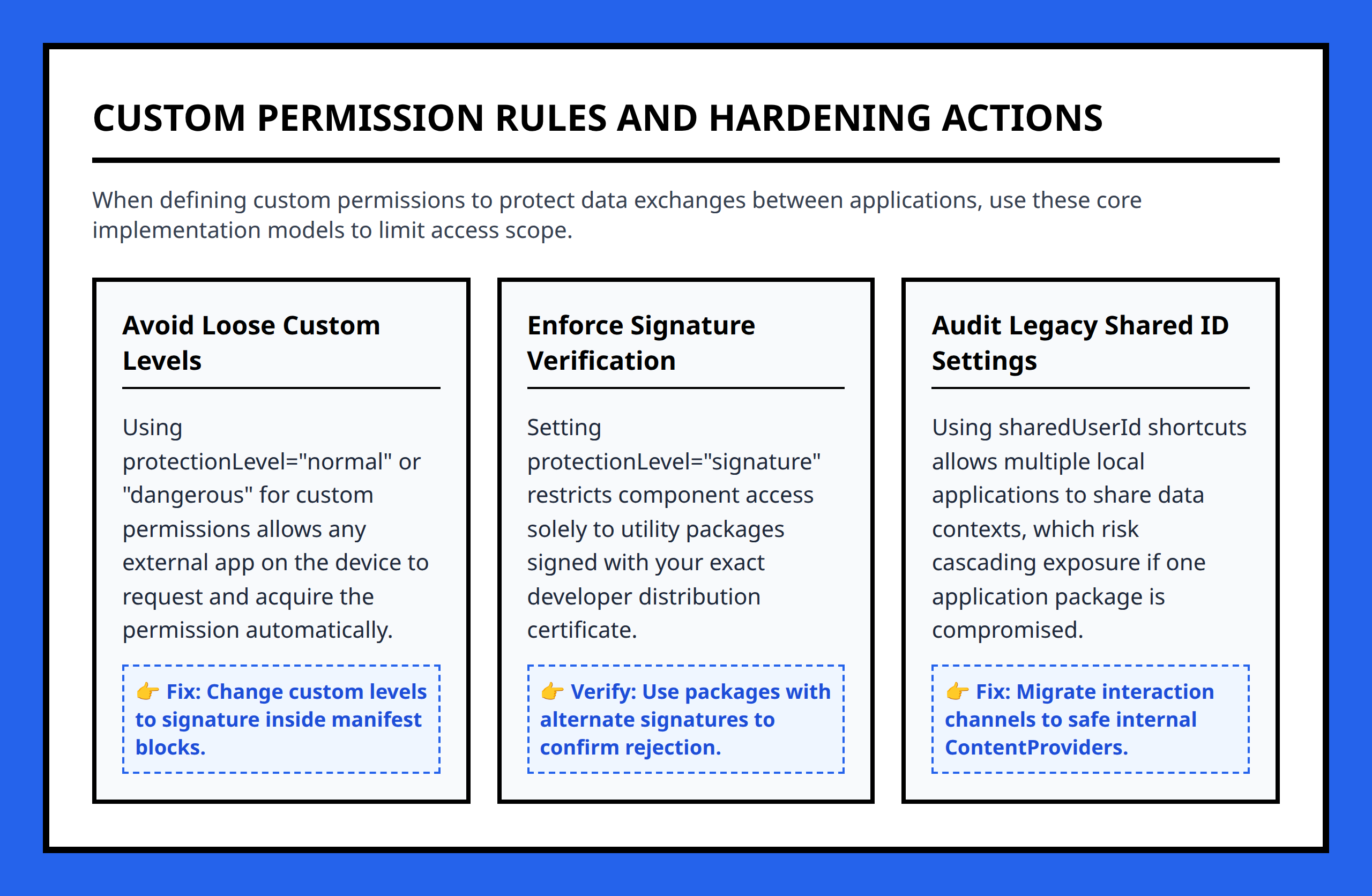
Android applications do not operate entirely alone. They often communicate through mechanisms such as activities, services, broadcast receivers, and content providers.
These communication pathways are powerful, but they also create risk when exposed carelessly.
An insecure IPC endpoint may allow another application to:
- Send unintended requests
- Trigger privileged actions
- Read protected data
- Inject malicious input
- Abuse application functionality
This category of mistake is especially important because the vulnerability may not appear obvious during normal app usage.
The application still works correctly for legitimate users.
The danger appears when another application intentionally interacts with exported components in unexpected ways.
I think many IPC problems come from developers focusing on functionality first and trust boundaries second.
If an app exposes a component externally, the developer needs to assume hostile interaction is possible. Android applications do not operate in isolation from other apps on the device.
Small Mistakes Combine Into Larger Exposure
What makes Android application security difficult is that weaknesses often overlap.
A single issue may not seem catastrophic on its own. But multiple small mistakes together can create meaningful exposure.
For example:
- An app requests excessive permissions
- Stores authentication tokens insecurely
- Logs sensitive debugging information
- Exposes an insecure IPC endpoint
Each issue increases attacker visibility or access slightly. Together, they create far more opportunity than the developer originally intended.
I think this layered-risk effect is easy to underestimate because application security problems rarely arrive as one dramatic failure. More often, they accumulate quietly through ordinary implementation decisions.
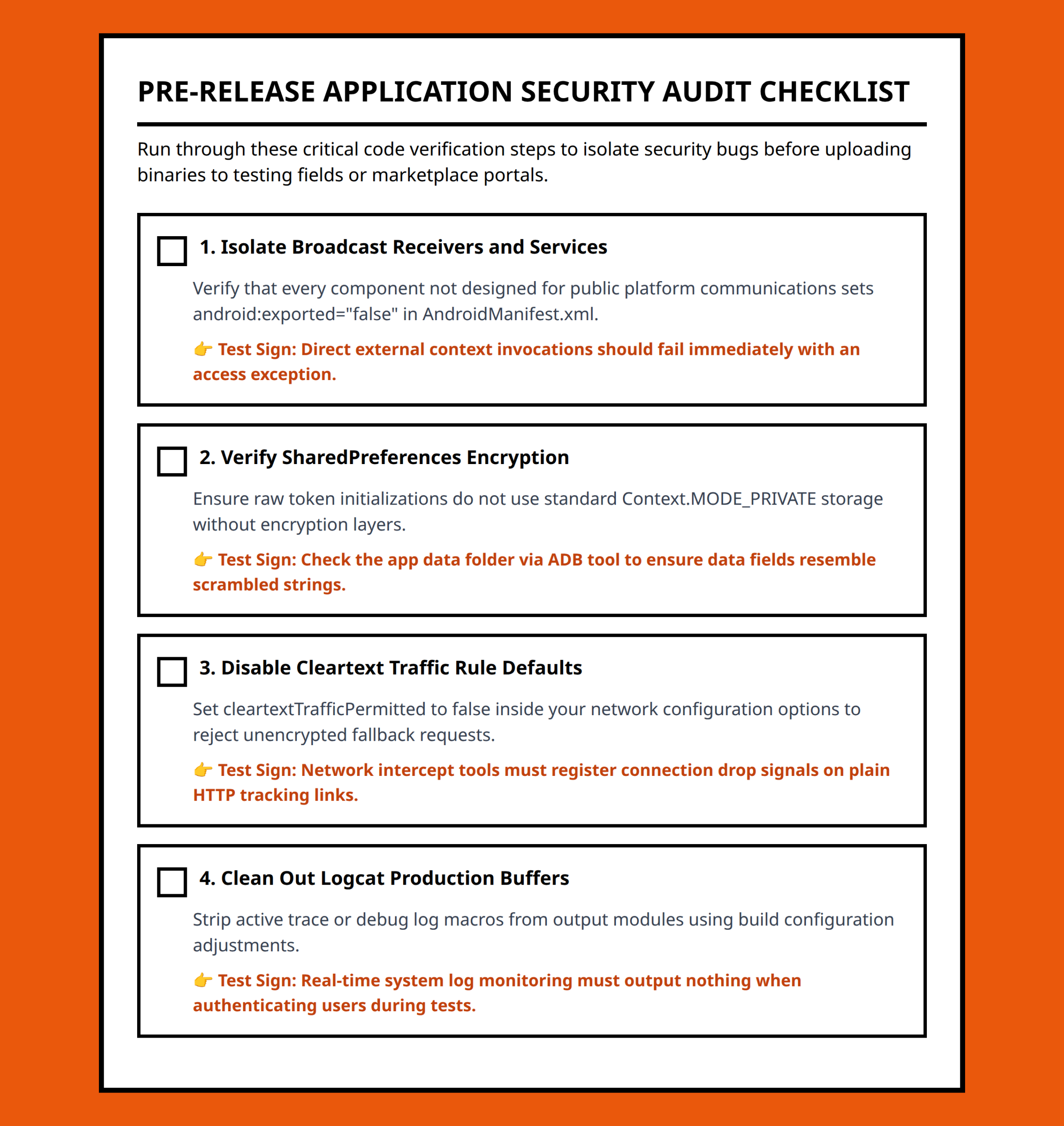
The Most Useful Security Habit Is Reducing Unnecessary Exposure
When I look at Android application security, I usually come back to one practical question:
Does this application expose more than it truly needs?
That question applies across permissions, storage, logging, IPC communication, and network behavior.
Applications become safer when developers reduce unnecessary access, minimize trust assumptions, limit exposed interfaces, and remove debugging shortcuts before release.
Android already provides many defensive mechanisms at the platform level. The recurring problems often appear when applications bypass those protections through convenience decisions that seemed harmless during development.
The difficult part is that insecure applications usually look normal until someone intentionally starts testing their edges.
- IPC (Inter-Process Communication): Methods Android apps use to communicate with other apps or system services.
- Broadcast receiver: An Android component that listens for system or application events and reacts to them.
- Content provider: A component used to share structured application data with other apps.
- Authentication token: A digital credential used to confirm that a user or application is already authenticated.
- API key: A secret identifier applications use to access external services or backend systems.
- Rooted device: An Android device where users or software gain privileged system-level access beyond normal restrictions.
- Attack surface: The collection of entry points attackers may attempt to exploit in an application or system.
- Permission enforcement: Android’s mechanism for controlling which protected features or data an application can access.
References:
- https://developer.android.com/privacy-and-security/security-tips
- https://medium.com/@hiren6997/7-common-security-mistakes-in-android-codebases-that-could-destroy-your-app-8d9fd22e4e28
- https://www.appknox.com/blog/top-10-security-issues-in-mobile-app-development
- https://www.toptal.com/developers/android/top-10-most-common-android-development-mistakes
- https://www.reddit.com/r/cybersecurity/comments/1pal0g9/what_are_realistic_mistakes_developers_make_when/
- https://www.reddit.com/r/cybersecurity/comments/1pal0g9/what_are_realistic_mistakes_developers_make_when/nrjvrrn/
- https://www.reddit.com/r/cybersecurity/comments/1pal0g9/what_are_realistic_mistakes_developers_make_when/nrjw99k/
- https://www.quora.com/What-are-the-common-mistakes-businesses-make-when-developing-mobile-apps
- https://www.quora.com/What-are-some-common-security-risks-when-developing-mobile-applications
- https://proandroiddev.com/the-hidden-security-flaws-in-kotlin-apps-nobody-talks-about-991ec72348d8
- https://leadgenapp.io/blog/posts-common-android-development-mistakes/
- https://www.quora.com/What-is-the-most-common-mistake-developers-make-when-building-apps-intended-for-emergency-use
- https://www.linkedin.com/pulse/top-10-android-application-security-best-practices-zvpyc
- https://medium.com/@kritstudy15/common-vulnerabilities-in-android-applications-8320bbc19613
- https://www.kaspersky.com/resource-center/threats/android-mobile-threats
- https://keepandroidopen.org/cta/
- https://www.reddit.com/r/cybersecurity/comments/1pal0g9/what_are_realistic_mistakes_developers_make_when/nrly2sv/