Android attack surface analysis is the process of identifying every pathway an attacker could use to interact with a device. The goal is not simply to find vulnerabilities, but to understand which interfaces expose meaningful security risk and why some entry points matter more than others.
When people first study Android security, they often focus on individual bugs. I understand why. Vulnerabilities are concrete and easier to picture. But most serious security analysis starts one step earlier.
Before anyone searches for a vulnerability, they first need to understand where interaction with the system is even possible.
That is what attack surface analysis really does. It turns a complex Android device into a map of reachable interfaces, trust boundaries, and exposure points.
Takeaways
- Attack surfaces are the reachable points where interaction with a device becomes possible.
- Android exposure changes depending on network access, local apps, wireless interfaces, and physical access.
- Some attack surfaces are always exposed, while others require proximity or device possession.
- Effective analysis depends on classifying interfaces by accessibility and privilege level.
Attack Vectors and Attack Surfaces Are Not the Same Thing
One distinction matters immediately in Android security analysis: an attack vector is not identical to an attack surface.
An attack surface is the collection of reachable interfaces or exposed pathways into a system. An attack vector is the specific method used to exploit one of those pathways.
I think many beginners accidentally merge these ideas together. They search for exploits first without understanding where interaction with the system is realistically possible.
That approach creates blind spots.
If a researcher cannot identify exposed surfaces clearly, they may spend time analyzing components that are not reachable under realistic conditions while missing interfaces attackers can actually access.
Good attack surface analysis narrows attention toward interfaces that matter operationally.
The First Question Is Always: Who Can Reach the Interface?
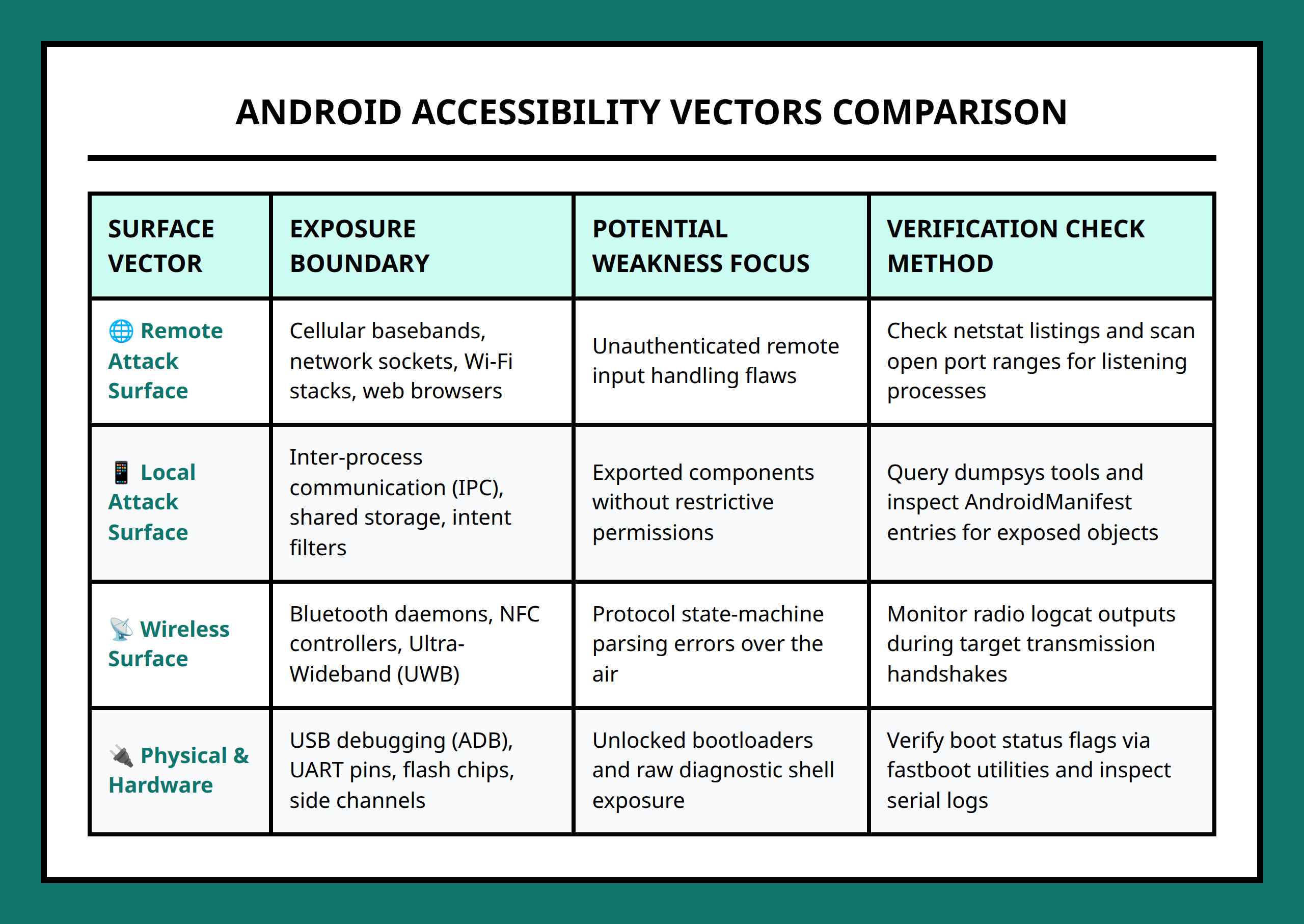
One of the most useful habits in Android security work is asking a simple question early:
Who can interact with this component?
That single question changes how exposure gets evaluated.
Some interfaces are remotely reachable across the internet or local networks. Others require a malicious application already installed on the device. Some surfaces only become accessible through physical possession of the hardware.
The accessibility level dramatically changes the practical risk.
A remotely reachable service exposed over Wi-Fi usually creates broader exposure than a debugging interface hidden inside the hardware casing. Both matter, but their threat models differ completely.
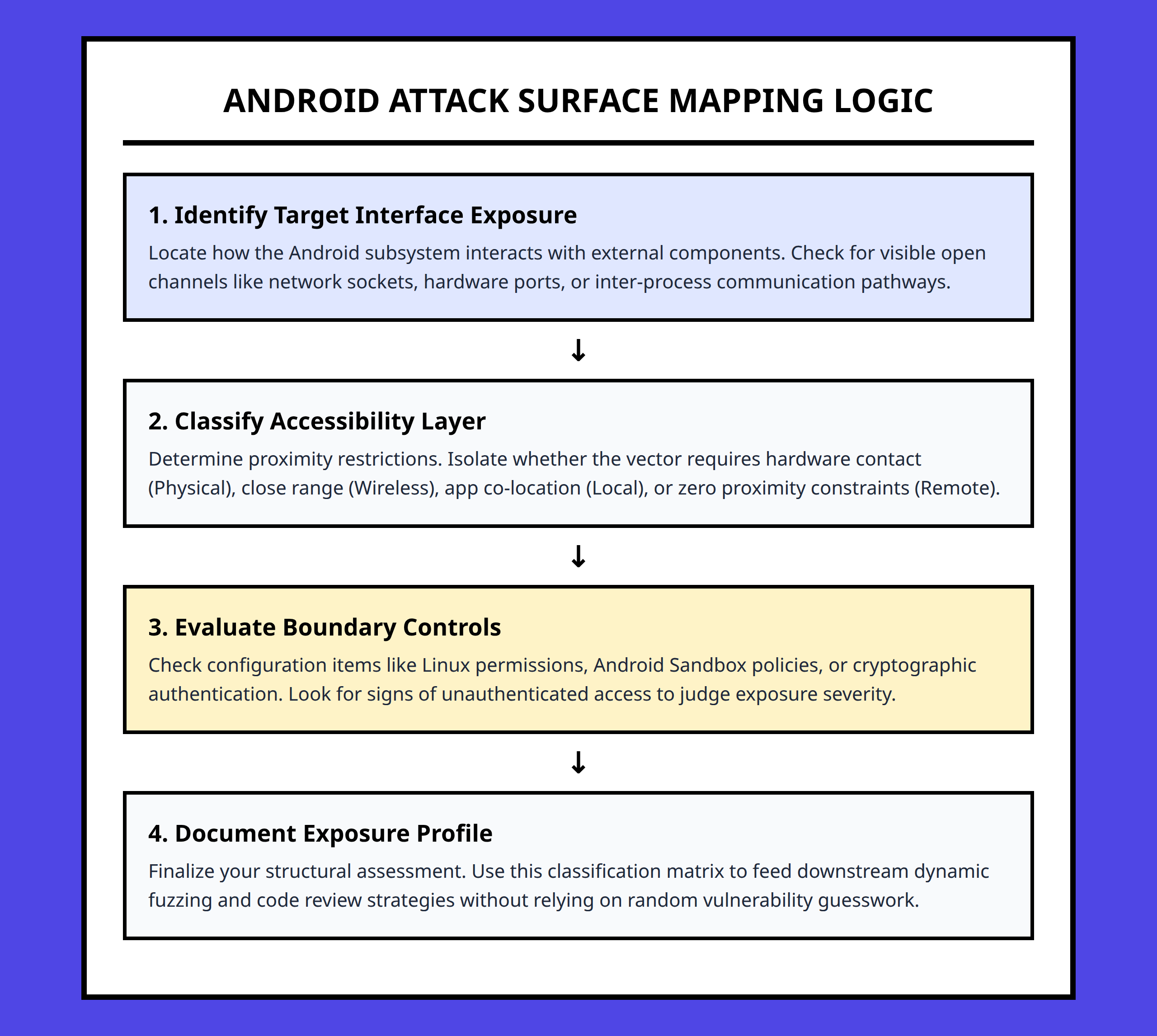
I usually think of Android attack surfaces as layers of proximity:
- Remote access
- Local software access
- Wireless proximity access
- Physical access
Each layer changes the assumptions attackers must satisfy before interaction becomes possible.
Remote Attack Surfaces Usually Receive the Most Attention
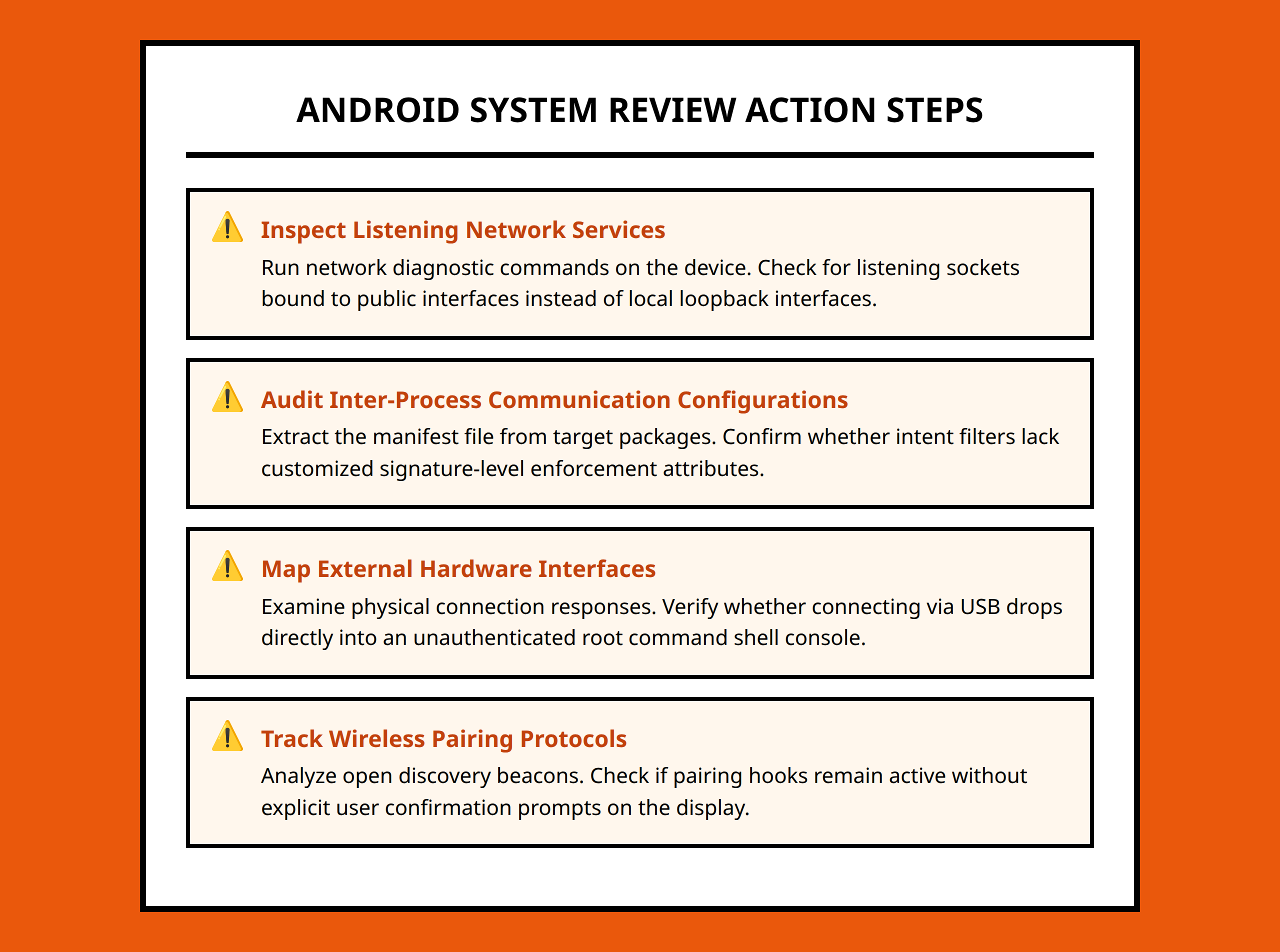
Remote attack surfaces are interfaces attackers can reach without physically touching the device.
These often include:
- Network services
- Web browsers
- Messaging systems
- Media parsers
- Internet-facing applications
- Cloud-connected functionality
Remote exposure matters because attackers can potentially target many devices at scale.
A vulnerable network-facing component may allow interaction from anywhere reachable through the network path. That dramatically increases potential attacker reach compared to interfaces requiring local access.
I pay particular attention to components that automatically process untrusted input.
Browsers, media handlers, messaging clients, and network parsers all receive outside data constantly. Every time a device automatically interprets external content, another possible attack pathway appears.
A realistic situation might involve a device automatically processing a malformed media file received through a messaging app. The user may never realize the risky interaction already occurred because the vulnerable behavior happens underneath the visible interface.
That is why remote surfaces often receive heavy security scrutiny.
Local Attack Surfaces Depend on Existing Device Access
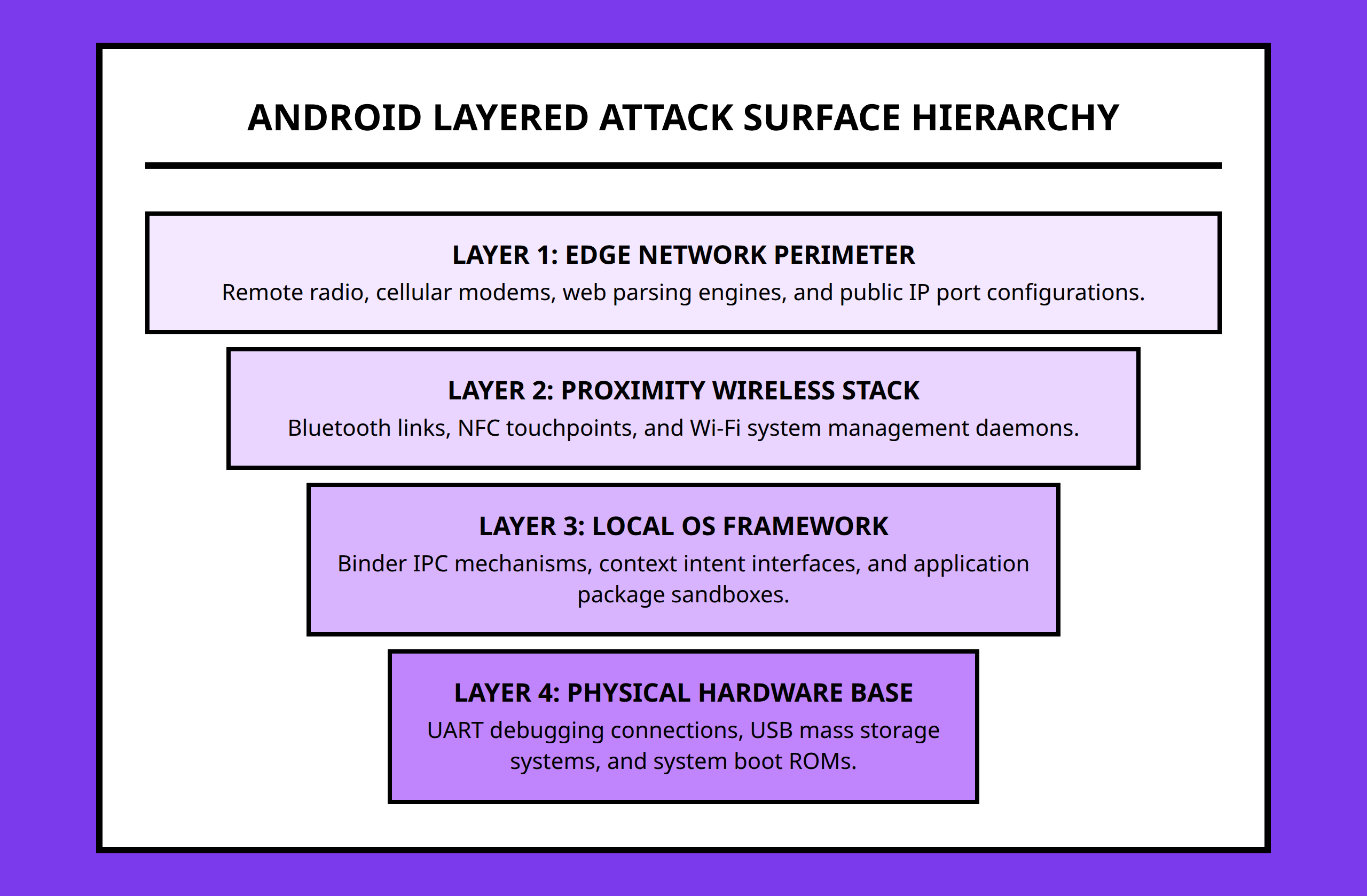
Local attack surfaces usually require an attacker to already control an application or process on the device.
This changes the threat model significantly.
The attacker no longer starts from zero access. Instead, they attempt to move beyond the permissions or restrictions already assigned to the local application.
Common local surfaces include:
- Inter-process communication endpoints
- Exported application components
- Shared storage
- System services
- Permission boundaries
- Debug interfaces
What I find interesting about local attack analysis is that many weaknesses emerge from trust assumptions between applications.
A developer may expose an interface believing only trusted applications will interact with it. But Android devices regularly run software from many different developers with varying security quality.
If a local interface accepts unsafe input or lacks proper permission checks, another application may abuse functionality that was never intended for external control.
This is one reason Android security depends heavily on carefully managing IPC exposure and permission enforcement.
Wireless Interfaces Create Their Own Exposure Layer
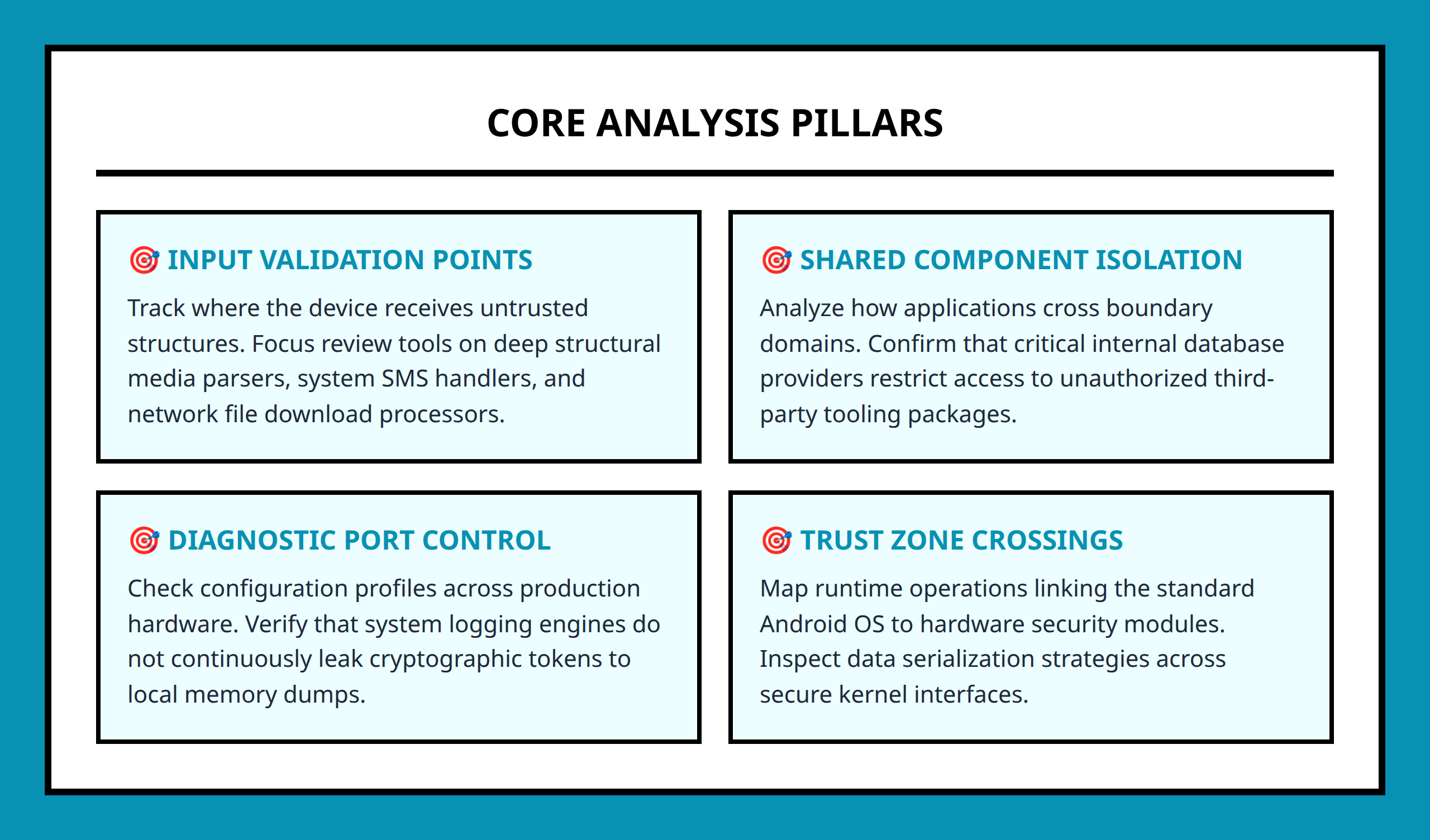
Wireless communication surfaces deserve separate attention because they operate somewhere between remote and physical access.
Bluetooth, NFC, Wi-Fi Direct, and similar technologies create interaction opportunities for attackers within proximity range.
These surfaces matter because devices constantly advertise, scan, pair, and exchange data wirelessly.
I think wireless attack surfaces are easy to underestimate because the interactions often feel invisible during normal use.
A user turns on Bluetooth headphones, connects a smartwatch, shares files wirelessly, or pairs a car system. All of those behaviors expand device interaction pathways temporarily.
Wireless protocols also introduce parser complexity, pairing logic, device discovery behavior, and trust negotiation mechanisms.
Every additional protocol layer increases the amount of code responsible for handling untrusted external data.
Physical Attack Surfaces Change the Rules Completely
Physical access creates a very different security environment.
Once attackers can directly handle a device, additional interfaces may become reachable:
- USB communication
- Debug ports
- Hardware interfaces
- Boot mechanisms
- External storage access
- Recovery environments
Physical access does not automatically mean compromise, but it removes many assumptions that normally protect the device.
I usually see physical attack surfaces as trust-boundary collapses.
Systems designed around remote attackers often behave differently once someone can connect cables, manipulate boot states, inspect hardware, or interact with debugging interfaces directly.
A practical example is easy to picture:
A company employee leaves a test device unattended during travel. The phone still uses strong application sandboxing and normal Android protections, but physical possession changes which interfaces become available for analysis or abuse.
The threat model shifts immediately because accessibility changes.
Attack Surface Analysis Is Really About Prioritization
One of the biggest misunderstandings in Android security is thinking every exposed interface carries equal risk.
They do not.
Effective attack surface analysis is really a prioritization framework.
Researchers evaluate:
- How reachable the interface is
- What privileges the interface exposes
- What data flows through it
- Whether untrusted input is processed
- How complex the underlying code path becomes
- What assumptions protect the interface
I think this perspective is more useful than memorizing lists of Android threats.
Threats change constantly. New applications, hardware features, protocols, and services appear every year.
But the analytical process remains stable:
Identify exposure. Classify accessibility. Understand trust boundaries. Evaluate reachable complexity.
That approach scales much better than chasing isolated vulnerability examples.
The Most Dangerous Surfaces Often Hide Inside Convenience Features
One pattern appears repeatedly across Android security research: convenience features frequently expand attack surface quietly.
Automatic media handling, wireless pairing, background synchronization, cloud messaging, and cross-app integration all improve usability.
They also increase exposure.
I do not think the lesson is that devices should remove convenience entirely. Modern smartphones depend on interconnected functionality.
The important point is recognizing that every feature introducing external interaction also introduces another place where trust decisions must be enforced correctly.
That is why attack surface analysis matters long before exploitation begins. It helps researchers understand where those trust decisions exist in the first place.
- Attack surface: The collection of all reachable points where an attacker may interact with a system.
- Attack vector: The specific method or pathway used to exploit a vulnerability.
- IPC (Inter-Process Communication): Mechanisms Android apps use to exchange information or request actions from other apps and services.
- NFC (Near Field Communication): A short-range wireless technology used for payments, pairing, and data exchange.
- Parser: Software that interprets and processes incoming data formats such as media files or network messages.
- Privilege: The level of access or authority granted to a user, app, or process.
- Trust boundary: A point where a system must decide whether incoming input or interaction should be trusted.
- Threat model: A structured way of thinking about who attackers are, what access they have, and what they may attempt.
References:
- https://medium.com/@mahmoudelshorpagy7/learning-android-pentesting-fundamentals-intents-activities-as-an-attack-surface-f3b7b321ffb0
- https://versprite.com/resources/blog/android-attack-surface/
- https://dl.acm.org/doi/10.1145/2661694.2661696
- https://scispace.com/pdf/malware-analysis-and-detection-on-android-the-big-challenge-2ikvj4lpkp.pdf
- https://www.exabeam.com/explainers/information-security/attack-surface-analysis-how-it-works-and-5-critical-best-practices/
- https://teamt5.org/en/posts/introduction-to-android-vulnerability-research
- https://www.researchgate.net/publication/376817856_AndrAS_Automated_Attack_Surface_Extraction_for_Android_Applications
- https://www.oreilly.com/library/view/android-hackers-handbook/9781118608647/9781118922255c05.xhtml
- https://blog.ostorlab.co/critical-attack-surface-of-mobile-applications.html
- https://www.wiz.io/academy/cloud-security/attack-surface-analysis
- https://www.ibm.com/think/topics/attack-surface-management
- https://www.geeksforgeeks.org/software-testing/what-is-android-penetration-testing/